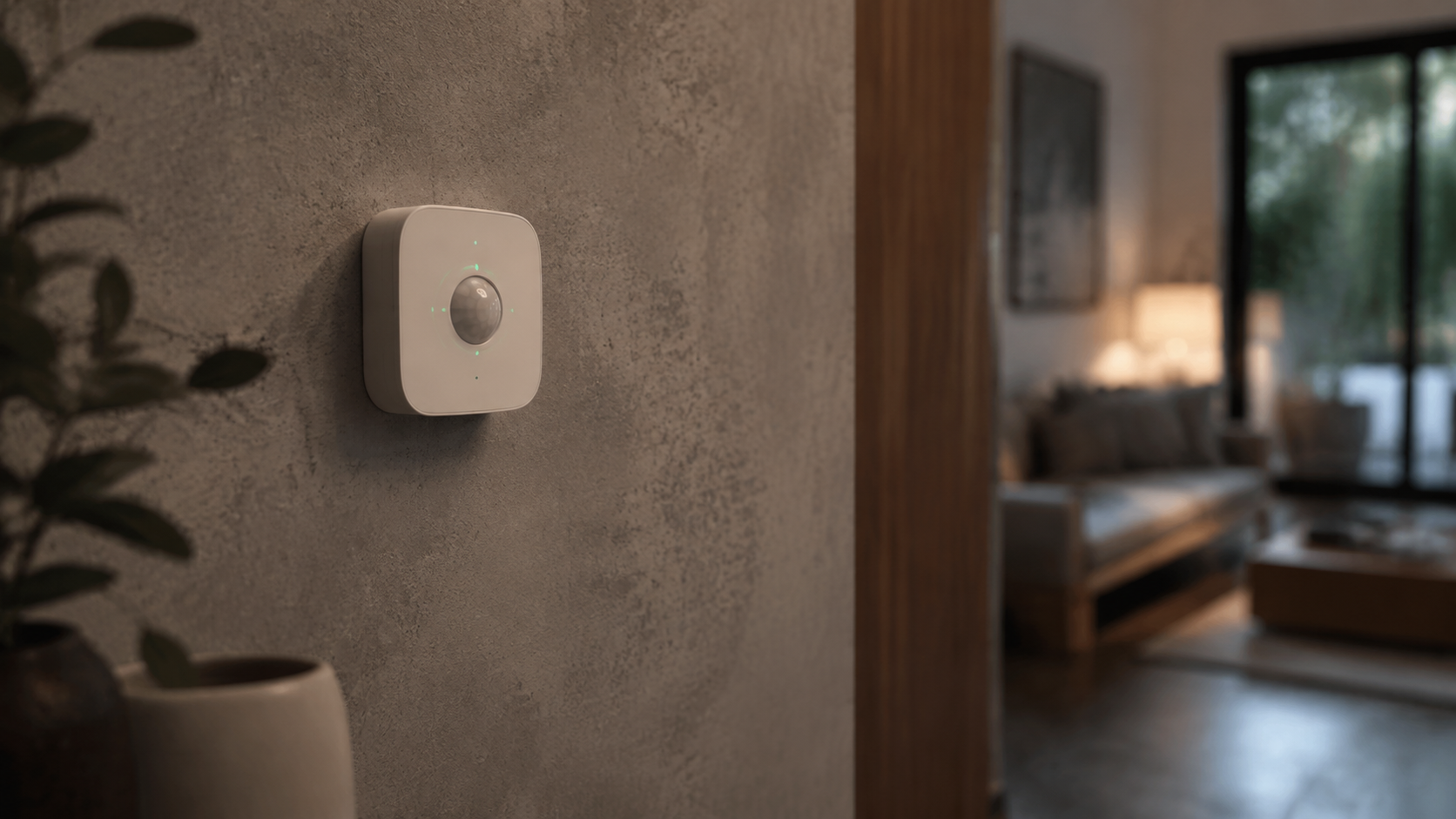
Learning how to automate lights with motion sensors can make everyday routines easier, improve visibility, and reduce the number of switches your household needs to touch. A well-designed system can turn on a hallway light when someone walks past, brighten a kitchen during meal preparation, or provide a soft path to the bathroom at night. It can also work alongside smart home security systems, thermostats, air purifiers, and other connected devices.
The best lighting automation is not simply about making lights react to movement. It is about creating useful rules that account for time, daylight, room activity, privacy, and the way people actually use a space. This guide explains the hardware you need, how to plan the automations, and how to avoid common problems such as lights switching off while a room is still occupied.
What Motion-Sensor Lighting Automation Does
A motion-sensor lighting setup detects activity and sends a signal to a smart bulb, smart switch, dimmer, or home automation hub. The system then follows a rule, such as turning a light on when motion is detected and turning it off after a selected period without movement.
Depending on the products you choose, the sensor may communicate over Wi-Fi, Zigbee, Z-Wave, Thread, Bluetooth, or a manufacturer-specific connection. Some devices work independently, while others need a compatible hub. Before buying, check whether the sensor, light, switch, and platform can work together.
Motion automation can be simple or highly customized. A basic rule might be:
- When motion is detected in the entryway, turn on the ceiling light.
- After five minutes without motion, turn the light off.
A more refined rule might add conditions:
- Run only after sunset.
- Use a low brightness level after bedtime.
- Keep the light on longer when the room is being used for work.
- Do not activate when the household is away.
Choose the Right Motion Sensor
PIR sensors
Passive infrared, or PIR, sensors detect changes in infrared energy caused by moving people or animals. They are common, affordable, and suitable for hallways, closets, staircases, bathrooms, and other areas where people move through a defined field of view.
PIR sensors generally respond best to movement across the sensor’s view rather than movement directly toward it. Placement matters, so check the manufacturer’s recommended height and detection angle. A sensor aimed at a doorway may work well for a passage, while one pointed down a long corridor may miss slow movement.
Millimeter-wave presence sensors
Presence sensors that use millimeter-wave radar can detect smaller movements than many PIR products. This makes them useful in offices, bedrooms, and living rooms where someone may sit relatively still. They can be more complicated to configure and may require careful adjustment to avoid detecting activity through thin walls or in adjacent areas.
For a desk, reading chair, or bedroom, presence detection can prevent the lights from turning off while someone is quietly working or resting. For a pantry or short hallway, a conventional PIR sensor may be all you need.
Light-level sensors
Some motion sensors include an ambient light sensor. This allows an automation to run only when the room is dim. A separate outdoor light sensor or smart hub condition can also provide a daylight check. Combining motion detection with brightness prevents lights from switching on unnecessarily during the day.
Select Smart Bulbs, Switches, or Dimmers
Smart bulbs are convenient when you want color temperature, dimming, or color control without replacing the existing wall switch. They need continuous power, however, so someone turning off the physical switch can make the automation unavailable.
Smart switches and dimmers are often a better fit for ceiling fixtures or rooms used by several people. They preserve familiar wall control while allowing motion-based routines. Some models require a neutral wire, and installation can vary by electrical box and wiring arrangement. If you are not qualified to work on household wiring, use a licensed electrician rather than guessing.
For a polished result, choose lighting that matches the room’s purpose. Warm, dimmed light can support a relaxed bedroom or living room atmosphere. A brighter neutral setting may be more practical for a kitchen counter, laundry area, or minimalist desk setup. In a dining room, gradual dimming can make an automated system feel intentional instead of abrupt.
Plan the Automation Before Installing It
Start by listing the areas where automatic lighting solves a real problem. Good candidates include:
- Entryways where hands are often full.
- Staircases and corridors used at night.
- Closets, pantries, and laundry rooms.
- Garages, mudrooms, and utility spaces.
- Bathrooms where bright overhead light may be uncomfortable overnight.
- Home offices where a presence sensor can support focused work.
Next, decide what should happen when the room is empty. You may want an immediate shutoff in a closet, a longer delay in a living room, or a gentle fade in a bedroom. Avoid applying one timeout to the whole home. Different rooms have different rhythms.
Account for daylight and time
A motion trigger should not automatically mean full brightness at every hour. Use a daylight condition whenever possible. At night, set a lower brightness level for pathways and bathrooms so the light improves safety without feeling harsh.
Time-based rules can also support atmosphere. For example, a living room may use a warm, moderate level in the evening, while a kitchen may provide brighter task lighting during preparation. This connects motion sensing with smart lighting and atmosphere rather than treating each fixture as a simple on-off device.
Define manual control
People should be able to override an automation. A wall switch, app control, voice assistant, or scene button can provide manual control when guests are present or when a room needs a different mood. Decide whether a manual change should pause motion rules temporarily or simply adjust the current light level.
How to Automate Lights With Motion Sensors: Step-by-Step
1. Confirm compatibility
Check the communication standard, hub requirements, electrical rating, dimming support, and software compatibility. If you use multiple brands, verify that your chosen platform can connect them reliably. A sensor that appears compatible on a product page may still have limited functions when paired with another ecosystem.
2. Install and position the sensor
Place the sensor where it can detect the movement that matters. Avoid aiming it directly at windows, heating vents, ceiling fans, or areas with frequent temperature changes. Test the field of view while walking normally through the room.
In a hallway, place the sensor so it sees people entering rather than only noticing them after they have passed. In a bathroom, avoid a position that detects movement through an open doorway if you want the bathroom light to respond only to occupancy inside.
3. Add the light or switch to the platform
Pair the light, switch, or dimmer with its app or hub. Give every device a clear name based on its location, such as “Upstairs Hall Sensor” or “Kitchen Sink Light.” Consistent names make future automations easier to understand and troubleshoot.
4. Create an arrival rule
Build the first automation with one trigger and one action: motion detected, then light on. Test it at different times and from different directions. If the light responds slowly, check the wireless signal, hub location, battery level, and device firmware.
5. Add a timeout
Choose a delay that fits the room. Short delays may work for a cupboard or passage, while a living room or office usually needs more time. If the sensor supports retriggering, make sure each new movement resets the countdown.
6. Add brightness and schedule conditions
Once the basic routine works, add a daylight condition and separate evening or overnight scenes. A bathroom might use a low warm setting during sleeping hours, while an entryway could use a brighter setting when someone arrives home after dark.
7. Test real household behavior
Walk slowly, stand still, sit down, carry laundry, open doors, and use the room as you normally would. Ask whether the light turns on too often, stays on too long, or switches off at an inconvenient moment. Adjust the sensor angle, timeout, or presence settings instead of accepting an irritating routine.
Useful Automations for Different Rooms
Bedroom
Use motion detection for a low-level bedside or floor light rather than the main ceiling fixture. A soft path can help with nighttime movement without disrupting sleep. Smart bedroom gadgets such as sleep sensors, curtains, and temperature controls can be coordinated with the lighting schedule, but keep essential functions available without relying on a phone.
Kitchen
Motion-activated under-cabinet lighting can illuminate counters when hands are occupied. Consider a longer timeout during cooking and a separate late-night scene with reduced brightness. Pairing lighting with kitchen appliances and organization routines can make food preparation more efficient without filling the room with unnecessary light.
Home office
A presence sensor can keep a desk lamp or task light active while someone is reading or typing. For a minimalist desk setup, choose a compact sensor and hide cables where possible. Use a manual scene for video calls so automatic dimming does not change the appearance of your workspace unexpectedly.
Hallways and stairs
These are among the easiest places to benefit from motion lighting. Use a low brightness level overnight and a brighter scene during active hours. If a hallway includes artwork, plants, or home decor and furniture that you want to highlight, indirect lighting can provide guidance while also improving the visual flow of the space.
Utility areas
Garages, laundry rooms, and storage areas often benefit from automatic lighting because people enter with full hands. A longer shutoff delay helps when sorting supplies or loading a robot vacuum and cleaner. Make sure the sensor can handle the room’s temperature range and dust conditions.
Connect Lighting With Security and Energy Controls
Motion-based lights can complement smart home security systems, but they should not be treated as a replacement for locks, alarms, cameras, or professional monitoring. An exterior light that responds to movement may discourage unwanted activity, while an indoor routine can indicate occupancy when the household is home. For privacy, keep indoor camera and sensor settings under regular review and choose products with clear data policies.
Lighting automation can also support smart thermostats and energy management. When a home mode changes to Away, unnecessary lights can turn off and the thermostat can move to an energy-saving setting. When someone returns, the entryway light can activate while the thermostat resumes a comfortable schedule. These routines work best when they include safeguards, such as excluding essential lighting and allowing manual overrides.
Reducing wasted illumination can support eco-luxury and sustainable goods choices, especially when paired with durable fixtures, repairable controls, efficient bulbs, and responsible materials. The most sustainable system is usually one that lasts, remains useful, and avoids frequent replacement.
Common Problems and Practical Fixes
The light turns on when nobody is there
Reflections, pets, heat sources, moving curtains, or detection through an open doorway may be responsible. Narrow the sensor’s view, lower its sensitivity, relocate it, or use a presence zone if supported.
The light turns off while someone is still in the room
This is common with PIR sensors when a person sits still. Increase the timeout, reposition the sensor to see more of the room, add a second sensor, or use a presence sensor designed to detect small movements.
The automation is slow or unreliable
Check battery condition, wireless range, hub placement, and network congestion. Firmware updates may improve performance, but update only through the manufacturer’s official app or documentation. If a cloud-dependent device repeatedly fails during internet outages, consider a local-control platform for essential lighting.
Guests find the system confusing
Keep a familiar switch or clearly labeled scene button available. Automatic features should reduce friction, not create a puzzle. In frequently shared rooms, use motion as an assistive feature while preserving ordinary controls.
Q&A: Motion-Sensor Light Automation
Can motion sensors control regular bulbs?
Yes, if the sensor is connected to a compatible smart switch, relay, or automation hub. A sensor alone cannot usually control a standard bulb without a switching device.
Should I use a motion or presence sensor?
Use motion sensors for walkways and brief visits. Choose presence sensing for rooms where people may remain still, such as offices, bedrooms, and living rooms.
Do smart lights need Wi-Fi?
Not always. Some use Zigbee, Z-Wave, Thread, or Bluetooth and may operate through a hub. Check whether automations continue locally when the internet is unavailable.
How long should lights stay on?
Set the shortest delay that does not interrupt normal use. Test the room, then extend the delay if the light switches off before people have finished.
Are motion-activated lights suitable for every room?
They are most useful in transition and utility spaces. In bedrooms, dining rooms, and social areas, combine motion triggers with schedules, scenes, and manual controls for a more comfortable experience.
Build a System That Feels Natural
The goal of learning how to automate lights with motion sensors is not to make every fixture react to every movement. It is to remove small inconveniences while preserving comfort, privacy, and control. Start with one hallway, closet, or bathroom. Choose dependable hardware, position the sensor carefully, add time and daylight conditions, and test the routine during real household activities.
Once the foundation is reliable, expand into layered scenes for atmosphere, security-aware arrival routines, energy-conscious Away modes, and wellness-focused nighttime lighting. A thoughtful system can support the way your home looks and feels, from a calm bedroom to an organized kitchen, without making smart technology the center of attention.